How to Recreate a Cinematic Close-Up with AI
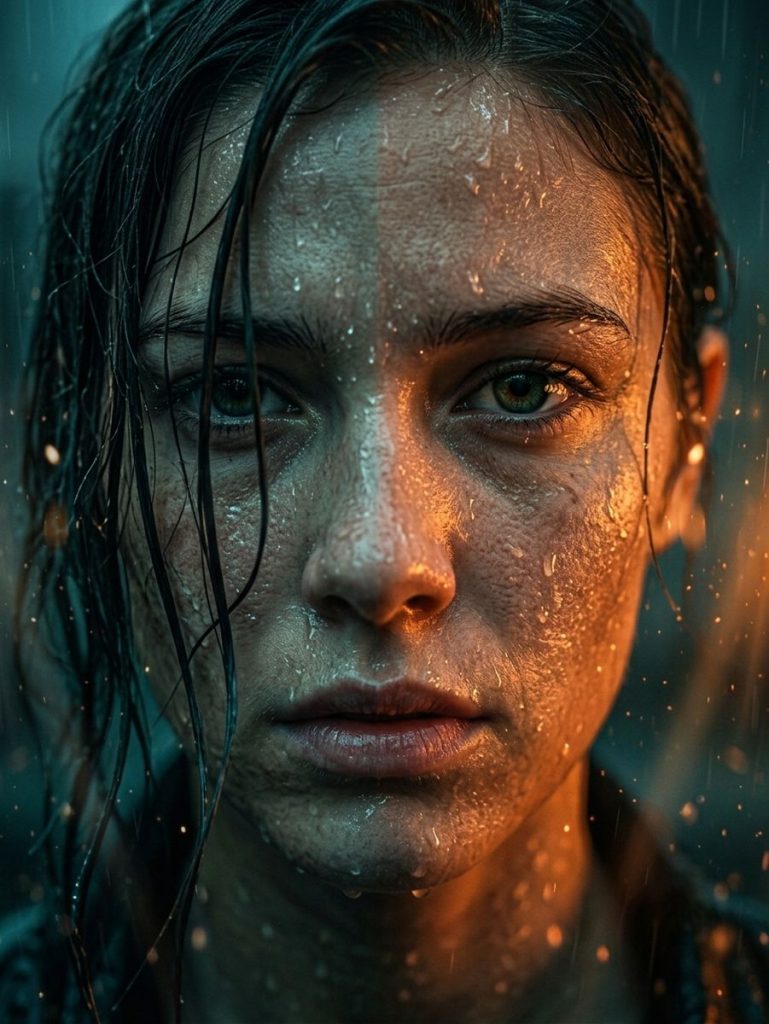
From cold shadows to the warmth of flames: the technique for handling extreme contrast and skin texture in a single shot.
The Problem (The challenge)
Anyone who uses AI image generators has run into this limit: asking for an extremely high-contrast portrait with two opposite lights (such as cold teal and warm orange) often ends in a mess of muddy colors. The AI tends to mix the tones on the face, flattening skin details and losing that drama typical of Hollywood films.
Technical Context
Until now, getting millimetric control over volumetric light and skin texture (skin pores, individual drops of water) required hours of post-production or complex Inpainting steps on Stable Diffusion. Generating everything in one shot, balancing real rain and light elements without colors bleeding, is the real challenge of photorealistic Prompt Engineering.
The Solution (The “Trick”)
The breakthrough is not simply asking for a ‘photorealistic portrait’, but in engineering the physics of the scene in the text. We created a prompt architecture based on the split-lighting technique, defining separate chromatic hemispheres and constraining the lens sharpness on a single focal point: the intensity of the gaze.
A Technical Curiosity
The secret to not generating ‘real fire’ when you only want a warm atmosphere? Use the concept of suspended atmospheric particles and specify cinematic rendering engines (such as the aesthetic of a film frame in RAW 8K quality). This approach has been optimized to deliver the best results both on latest-generation models such as ChatGPT (Image 2.0) and for handling light vectors on Adobe Firefly.
The Call to Action
Want to find out the exact text formula to master this lighting and apply it to your portraits? Watch the video tutorial below or download our ready-to-use resource.
–
–